
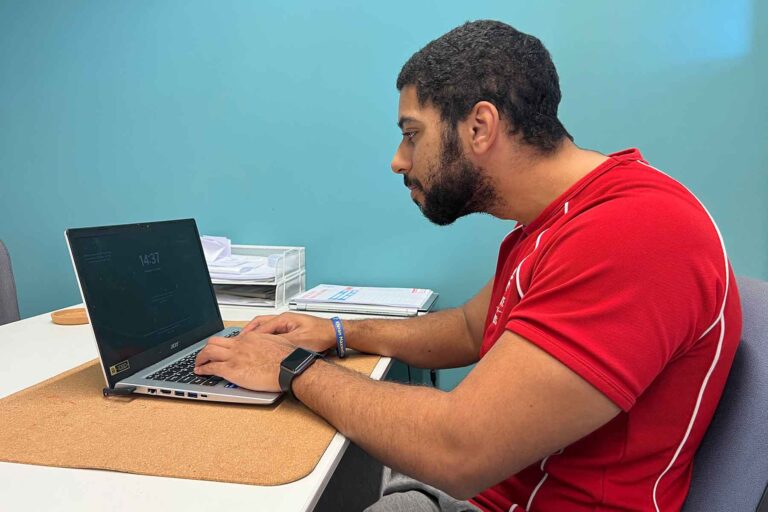
Being at a desk for long periods can lead to uncomfortable and sometimes damaging postural issues.
The good news is you can avoid such workplace postural issues as a rounding of the shoulders, hunched back, pointing chin and phone cradling.
Although these issues can be mildly uncomfortable. After a while, they can become chronic with long-term discomfort.
In this article, we will focus on pointing chin and steps to prevent long-term pain and postural dysfunction.
Steps to prevent ‘pointing chin’ for desk workers.
In the article on postural desk issues, we discussed the importance of a display screen equipment (DSE) assessment and briefly touched on the areas covered. Many postural issues can be alleviated with an ergonomic desk set-up. In terms of pointing chin, our main area of focus is screen height.
In the modern workplace, many of us find ourselves using laptops, hot desking, working across multiple sites or just simply not being informed of the importance of screen height. For people with a permanent workstation, this can often be a simple fix.
Most monitors are now height adjustable and can be a low-cost fix to implement if not through monitor arms. Ask a colleague for help with this, as you sit at your desk with proper posture, the taskbar or top of the viewable area on your screen should be level with your eyes. This will raise your head, reducing strain on your neck and shoulders and reducing forward head tilt, or pointing chin.
For laptop workers who may spend long periods using one, consider using a laptop raiser or even a pile of books and an external mouse & keyboard. This is especially useful for those of us who use a laptop at a desk for long periods. Typically, a laptop raiser can fit inside your laptop bag, with a small keyboard and mouse making mobility a feasible option.
We have briefly discussed standing in the workplace and invited you to Discover how often you should stand up. Sometimes mobility, space and environment can be an issue, so why not consider desk-based exercise?
Simple yet effective, our head and neck stretching, and exercises can help alleviate the pain and discomfort found in being in a desk environment for long periods.
Standing with your back to a wall, tuck your chin down as far as is comfortable and feel the stretch down the back of your neck. Hold for five seconds, and slowly return your head to the wall in an upright position. Repeat six to eight times.
For neck rotations, sit in your chair with good posture and shoulders relaxed. Turn your head to the left, as far as is comfortable for you, and hold for three seconds. Slowly return to the centre and repeat on the right-hand side. Repeat three times on each side, seeing if you can gradually increase the range of motion.
Check out our insights on desk-based exercise and stretching for further ideas.
A common, yet often missed trigger for head tilt can be tightness around the pectoral muscles. Originating at the clavicle and sternum and inserting into the humorous, the chest muscle that is the pectoralis major plays a role in upper back and neck tightness and strain. Often the muscle becomes shortened due to the position of our arms at a mouse and keyboard, which then puts strain on our upper back, shoulders, and neck. This can cause rounding of the shoulders, neck pain and in turn, head tilt.
The experienced team at Corporate Personal Wellbeing can offer a range of soft tissue techniques to help return your body to the proper form and function. A soft tissue release of the pectoralis major will help return your spinal area to a natural position, ensuring equal movement and use of the anterior and posterior chain. This will help to reduce the pain and discomfort causing pointing chin.